

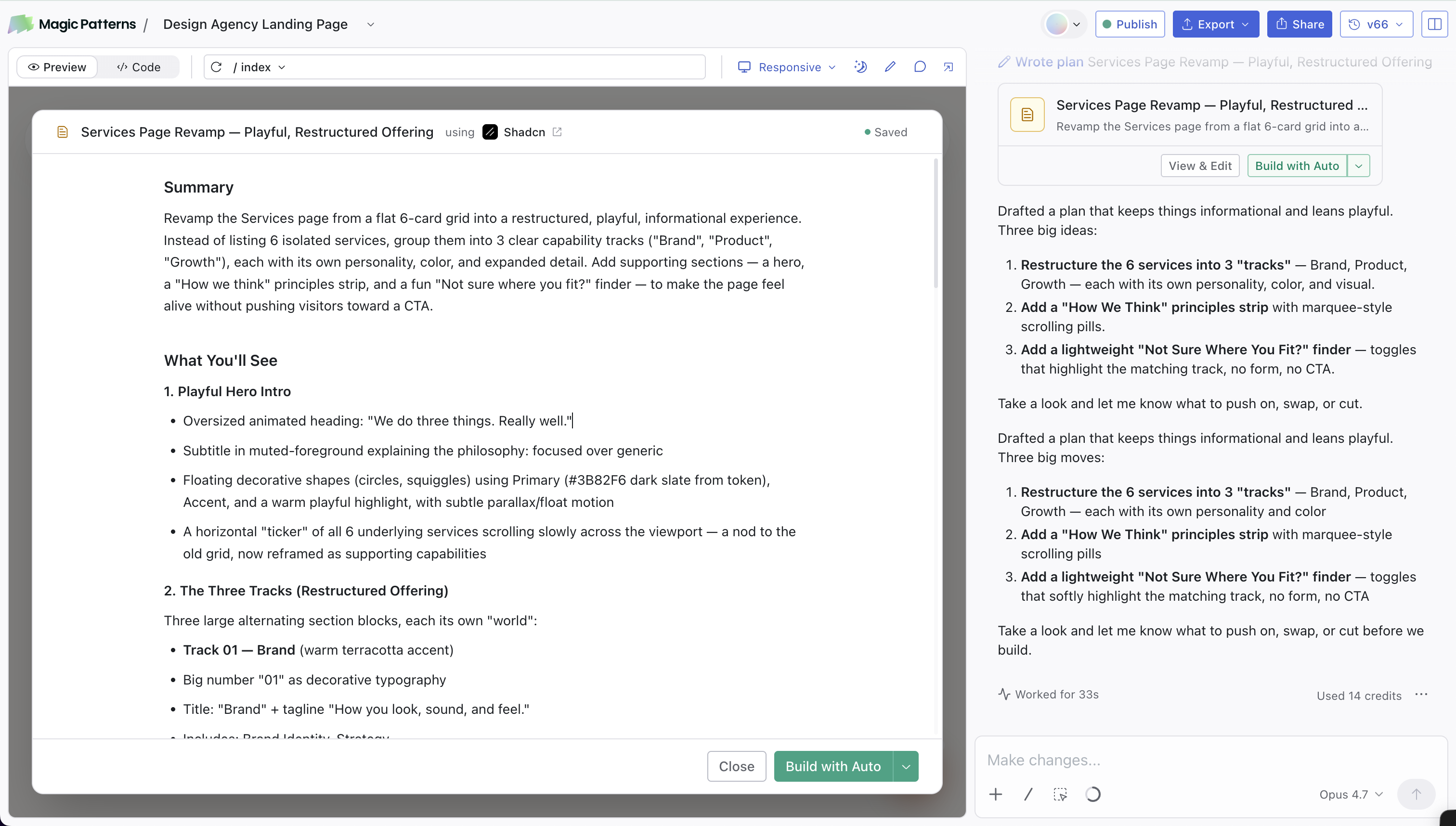
/Plan is a chat mode that turns the agent into a planning partner. Instead of jumping straight into editing your design, the agent asks a couple of clarifying questions, drafts a short plan you can edit, and only writes code once you approve it.
Plan Mode uses credits because the AI is actively reasoning about your design.
How it works
1
Pick Plan from the slash menu
Type
/ in the chat input (in the dashboard or the editor) and select Plan.2
Answer a quick question or two
The agent usually replies with 1 to 3 multiple-choice questions to narrow down the request. The first option is the agent’s recommendation. You can also dismiss the questions if you want the agent to go ahead with its best guess.
3
Review the plan
A plan editor opens over the design preview and streams in a short markdown plan with sections like Summary, What You’ll See, and User Flow. Edit anything you want directly. Changes are auto-saved.
4
Hit Build
Click Build at the bottom of the plan editor. The agent uses the model currently selected in chat, switches out of Plan mode, and starts implementing the plan.
Read more
How to Prompt
Tips, chat modes, skills, and prompting do’s and don’ts.